…Plus bonus tutorial on transfer sheet restoration! (at bottom of page)


Restoration Tutorial Part 178: How to Remove Creases from Scanned Artwork
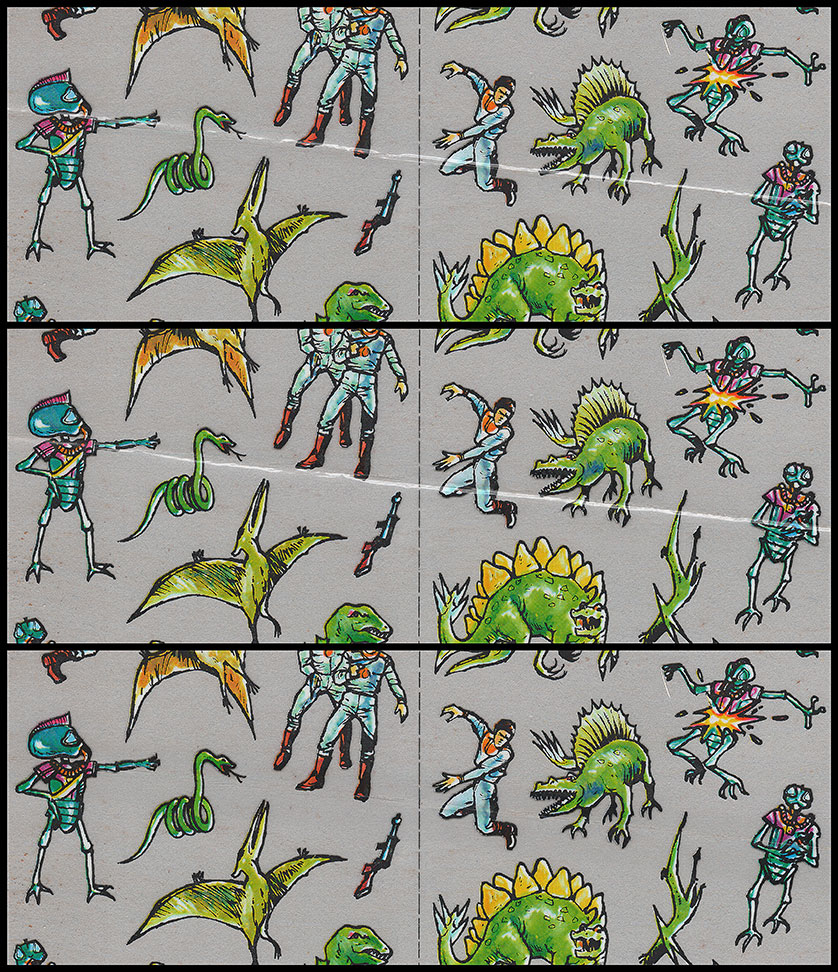
- The crease in this transfer sheet appears to the scanner tube as a hill appears to the sun; scanning the sheet the right way up highlights a streak across the upper side. So a white ribbon appears though the arm of the alien figure on the left of the top panel.
- However, if we reverse the artwork in the scanner, & scan it the other way up (180º rotation), the 'sunlit' side will now be the other side of the 'hill'. Then we reverse the artwork so it's the same way up as the first scan, but with the white streak appearing BELOW the alien's arm (middle panel).
- In the bottom panel, we simply combine the two scans in 'Darken' mode, so that the white streaks cancel each other out. The crease has disappeared as if by magic! (Actually by physics, as usual.)
Simple, but effective.
(Of course, the pixel-perfect lining up of the two scans is THE DEVIL'S OWN WORK!)
For more advanced restoration tips, see also "Destroying a Panorama".